Key Highlights of role of technology in education
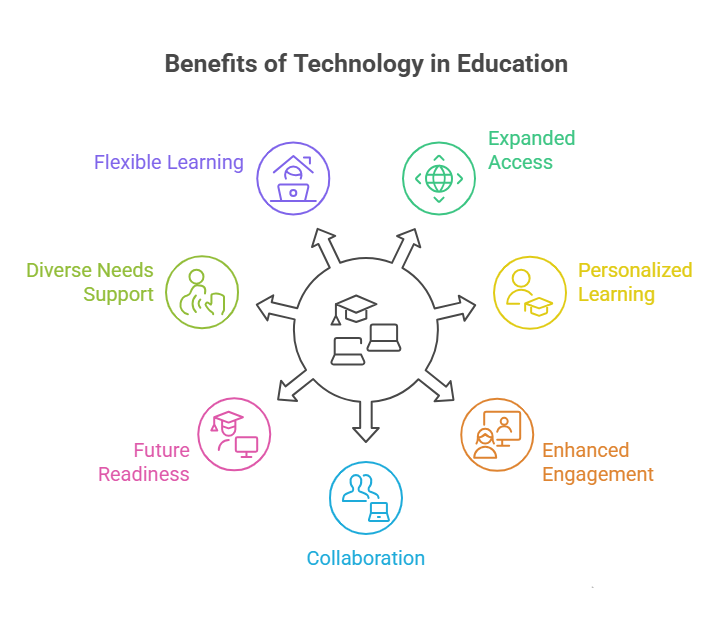
- Technology makes it easy to get learning materials from anywhere, so students can get over geographical barriers.
- It helps each student have their own learning experiences. That way, they can learn at their own pace and in the way that matches their learning styles.
- Digital tools and multimedia presentations help make class more of an engaging learning environment. These things help boost student participation.
- Online platforms help with group projects and make it simple for students to build communication skills by talking in discussion forums.
- The integration of technology gives students the digital literacy skills they need for most jobs in the future.
- Virtual classrooms let students have remote learning when and where they need it, giving people everywhere more chances to learn.
Introduction
Technology is now a big part of the educational experience in Canada and in many other places around the world. In schools from kindergarten all the way to secondary education, digital resources are changing the way teachers teach and the way students learn. This shift highlights the role of technology in education as more than just using new tools. It helps make learning environments better, more interesting, and open to all students. These steps also get students ready for the digital future.
The Role of Technology in Education: 7 Key Benefits
The integration of technology in classrooms brings many benefits for students and teachers. Educational technologies turn old ways of teaching into lively and special learning experiences. This change helps improve student learning and gets them ready for what is to come.
Looking at these benefits shows why technology has an important role in today’s education. Here are seven ways technology makes learning better.
1. Expanding Access to Learning Resources
One of the greatest benefits of technology in education is the expanded access to learning resources. Students can reach beyond traditional textbooks to explore updated digital materials in real time. With an internet connection, they can use online libraries, read academic articles, and access multimedia resources from anywhere, making quality education more inclusive even for those far from urban centers. Technology encourages curiosity and self-directed learning by providing various options to explore. Key digital resources include:
- Digital textbooks and e-books
- Online courses and educational videos
- Interactive educational apps
- Virtual museum tours and simulations
2. Supporting Personalized and Adaptive Learning
Every student learns in their own way and at their own speed. Technology helps us meet these individual needs. Learning platforms that use artificial intelligence and machine learning can change the level of work based on how a student is doing. This means students get help where they need it most.
This way of learning makes sure students who have a hard time with something get more practice. Students who know it well can try harder work. This keeps students from getting bored or upset and helps make learning better. Each student can focus on what they need, without slowing down the class.
Technology supports personalization by:
- Letting students learn at their own pace.
- Changing for different learning styles by using lots of ways to show the ideas.
- Giving instant feedback on practice exercises.
3. Enhancing Student Engagement and Participation
Technology changes the way students learn. It makes learning active and fun instead of just listening to a teacher talk. With technology, students get to use dynamic tools, not only hear things. This helps make an engaging learning environment for everyone. It keeps students interested and helps them get complex concepts in a better way.
For example, in history, students can take a virtual tour to see old ruins. In science, students can do a simulated experiment when it is hard to do in a real lab. Using game-like ideas, called gamification, adds more fun to learning. This makes quizzes or review time feel like games and gets students to take part more.
Technology helps us create an engaging learning environment with:
- Interactive smart boards and multimedia presentations.
- Educational games and quizzes.
- Collaborative online projects.
4. Enabling Collaboration and Communication
Today’s workplaces rely on teamwork, and technology helps students build these skills early. Digital tools let students work together on group projects, share ideas, and offer real-time feedback even from different locations. Platforms with discussion forums and video conferencing allow students to communicate and learn from peers worldwide, preparing them for future careers. This mirrors real-world teamwork and connects students with global experts. By using collaborative technology, students develop communication and cooperation skills essential for their professional lives.
Tools that help people work together include:
- Cloud-based documents for real-time editing.
- Online discussion forums.
- Video conferencing for virtual group meetings.
- Shared digital whiteboards for brainstorming.
5. Preparing Students for Future Careers and Digital Skills
In today’s digital world, knowing how to use computers and the internet is just as important as being able to read and write. When schools add technology to learning, students build the essential skills they will use in jobs later on. They start with simple computer skills and move up to things like coding. Students also get the chance to try out real tools used in different types of work.
This learning gives students more than just technical skills. By using technology for their work, they build critical thinking, problem-solving, and digital communication skills. Schools that teach these things help students get ready for the jobs we have now and in the future.
Key skills developed through technology include:
- Digital literacy and communication.
- Critical thinking and online research.
- Coding and technical problem-solving.
6. Providing Support for Diverse Learning Needs
Technology is a great tool that helps make the classroom better for everyone. It helps all students, including those who have different learning needs or have a disability. With assistive technology, every student gets the support they need to join in and learn.
For example, when a student can’t see well, they can use a screen reader. This helps them read digital textbooks. A student with dyslexia can try text-to-speech software. These types of technology let students learn at their own pace and in the way that fits their learning styles. This also helps them feel more sure about themselves and what they can do.
Here are some examples of assistive technology:
- Text-to-speech and speech-to-text software.
- Customizable display options, like larger fonts or different colors.
- Digital magnifiers.
- Alternative keyboards and input devices.
7. Facilitating Flexible and Remote Learning Opportunities
Technology has changed the way we learn by removing limits that the old classroom had. Now, with online learning, you can join virtual classrooms. This means people can keep learning, even after school hours and past any geographical barriers.
This new flexibility helps students in many ways. Some students may be sick, travel a lot, or have other things they must do. It can be hard for them to get to a real school. With online platforms, they get lessons, homework, and help from teachers anywhere there is internet. This lets learning always go on. Many schools and even colleges now have strong online programs.
Technology lets us be flexible through:
- Virtual classrooms people can join live or watch later.
- Online platforms used for turning in homework.
- Digital tools that help people talk to their teachers.
How Technology is Used in Canadian Classrooms
In Canada, the use of digital tools in classrooms keeps growing. Students fand teachers use tablets and laptops for research. Interactive whiteboards help with lessons, making learning easier. These days, the use of digital tools is common in schools. Many school districts in the country, like those in Ontario, use technology to help students learn better and to make admin tasks easier.
This move helps make lessons more fun, fits each student’s needs, and matches life in today’s world. In the next sections, you will see the types of digital tools you will find being used in a Canadian school.
Digital Learning Tools and Everyday Classroom Technology
Canadian classrooms utilize a range of digital tools that enhance both teaching and learning. Teachers use multimedia, such as interactive whiteboards, to present complex ideas and engage students. Laptops and tablets allow students to research, use educational apps, and complete assignments digitally
Educational software offers targeted practice in subjects like math, science, and languages, while digital quizzes provide immediate feedback to assess understanding. These tools also assist teachers with administrative tasks like automated grading and lesson planning, saving time and enabling more personalized instruction. Overall, technology helps create a more efficient, interactive, and supportive classroom environment.
| Tool Type | Classroom Application |
|---|---|
| Interactive Whiteboards | Displaying multimedia content and enabling student interaction. |
| Laptops & Tablets | Conducting research, accessing educational apps, and writing reports. |
| Educational Software | Providing practice for subjects like math, science, and languages. |
| Digital Quizzes | Assessing student understanding with instant feedback. |
Online Learning Platforms and Virtual Classrooms
- Online learning platforms, such as Google Classroom and Microsoft Teams, provide a digital space where teachers and students in Canadian schools can collaborate. Teachers use these tools to post homework, share learning materials, and communicate with students and parents in one convenient location.
- These platforms became essential when schools shifted to online learning, allowing classes to continue without interruption. Virtual classrooms enable teachers to hold live video lessons, making it possible for students and teachers to interact and ask questions in real-time.
- Even for in-person students, learning management systems offer easy access to homework, lessons, and updates at any time. Many international school programs also use these platforms to connect students from around the world.
Assistive Technology for Inclusive Education
Assistive technology has a big part in helping to make Canadian classrooms good for all students. These educational technologies are made to help students who have physical, sensory, or learning needs. They help students get over challenges and join in with others. The main goal is for all students to get the same chance at learning.
For example, one student who finds it hard to write by hand can use voice-to-text software. With this, they can finish their work with less struggle. Another student could use a digital calendar. This helps them stay on top of what they have to do. At schools like USCA Academy, using assistive technology is about helping every child with their individual needs. These tools give all students a better shot at being their best.
Challenges and Considerations in Using Technology for Education
While the benefits of technology in education are clear, we need to talk about the challenges too. Just putting devices in a classroom will not make learning better by itself. There are problems like the digital divide, distraction, and data privacy. All of these need to be fixed for the use of technology to really help students.
Careful planning is very important. Schools and teachers must have good rules and training. This will help them manage the challenges well. With the right support, technology can give students a good learning experience instead of making things harder. The next sections will talk about what you should know about the use of technology and the digital divide.
Addressing Equity and Access to Technology
One major challenge in using technology for education is the digital divide the gap between those who have access to devices and the internet and those who do not. This divide can cause some students to fall behind when they lack tools needed for homework or online classes. School districts in Canada are working to address this by loaning devices or providing Wi-Fi hotspots, aiming to give all students equal opportunities to learn. Ensuring equity in technology use means focusing on:
- Access to good internet at home.
- Each student having a good device to use.
- Helping students and families learn how to use the technology.
- Making sure digital resources can be used by students with disabilities.
Data Privacy, Student Information Protection, and Screen Time Balance
More student information is stored online, raising concerns about data privacy and security. Schools must have strict rules to protect grades and personal details from unauthorized access and misuse. It’s important for parents and students to understand how data is collected and used. Another consideration is screen time while technology supports learning, excessive use can cause eye strain, fatigue, and difficulty focusing. Teachers and parents need to work together to help children use technology wisely and watch for too much screen time, ensuring students feel well and benefit from tech.
Key considerations are:
- Implementing strict data privacy and security protocols.
- Teaching students about digital citizenship and online safety.
- Encouraging a balance between screen time and offline activities.
Conclusion
To sum up, the role of technology in education brings many good things that make learning better for students all over Canada. It helps offer more resources, lets learning be made to fit each student, and helps students work together and talk with each other. Technology gives students the main skills they will need for work in the future.
But, there are problems that must be watched, like making sure all students have the same chance to use technology and keeping student information safe. When teachers and parents look at these things and find answers, they can make schools a place where technology works well for learning. If you have other questions or want help, reach out to us to see how the role of technology can help you with your learning.
Frequently Asked Questions
1. What is the best technology for education?
There is not just one best technology to use in education. The best choice depends on what you want students to learn and what they need. The most successful way is to use a mix of educational technology. For example, there are interactive digital tools, online platforms for people to work together, and software that can change to help each student learn. When you put these together, you help make learning better and more open for everyone.
2. What impact does technology have on student engagement and motivation?
Technology can help a lot with student engagement and keep students interested in class. Interactive things, multimedia resources, and educational apps can make the learning process much more fun and lively. When students join in and take part, they are able to stay focused and remember things better. They also start to like their studies more over time.
3. Can the use of technology in education lead to better academic outcomes for students?
Yes, when used the right way, technology can make student performance better. It gives students access to more educational resources. It also lets them have learning paths that fit who they are. There are also fun things for students to do, so they understand ideas more. A learning management system can help students and teachers stay organized. These things can all lead to better grades and growth in school.
4. How can parents support their children’s learning with technology at home?
Parents can help their kids by looking at educational apps and online resources with them. They can also set up a spot at home for online learning where there are no distractions. It is good to talk about online safety, too. When parents get involved and talk openly about how kids use technology, it helps children remember what they learn at school. It also supports good habits when using the internet.